

Windows Agent
File integrity monitoring & malware detection on Windows Endpoint
Using Wazuh, I’ll be monitoring file integrity on my Windows endpoints, by setting up rules for registry persistence techniques used by malware. I’ll use Wazuh’s VirusTotal integration and active response for removing threats. For malware detection, file hashes & YARA rules integration to block and identify malicious tools and malware.
File Integrity Monitoring
The file integrity monitoring module detects changes to files by comparing them with a baseline. To add a directory or a file to monitor, I’ll be changing including the path on the C:\Program Files(x86)\ossec-agent\ossec.conf like this:
<syscheck> <directories>path/to/file/or/directory</directories></syscheck>And then restart the Wazuh agent with admin privileges:
Restart-Service -Name wazuh
Monitor windows startup folder
Wazuh default configuration includes the windows startup folder. (to look for malicious scripts or programs that are set to run on startup)
Can check the working using the EICAR test file.
cd "C:\ProgramData\Microsoft\Windows\Start Menu\Programs\Startup" Invoke-WebRequest -Uri https://secure.eicar.org/eicar.com.txt -OutFile eicar.txtAnd then remove the item: Remove-Item eicar.txt
Generated events can be found on Wazuh.
Windows Registry monitoring
Monitoring registry changes is crucial to ensure system stability and security. The default windows registry entries to monitor are found on the ossec.conf file on the agent machine. To add monitoring all entries of the Software path, we can use:
<windows_registry>HKEY_LOCAL_MACHINE\Software\*</windows_registry>Wazuh default config already includes the “Run” and “RunOnce” entries that are used for malware persistence.
<syscheck> <windows_registry arch="both">HKEY_LOCAL_MACHINE\Software\Microsoft\Windows\CurrentVersion\Run</windows_registry> <windows_registry arch="both">HKEY_LOCAL_MACHINE\Software\Microsoft\Windows\CurrentVersion\RunOnce</windows_registry></syscheck>To monitor changes of the associated registry values, we can go and add a new registry value in the specific registry path. I am adding a “Demo Value” with Data as “cmd” to make the command prompt run when the user logs in.
The associated changes can be observed in events of the Wazuh agent.
Install Sysmon
Wazuh collects the necessary Windows Events by default. But it is not enough. To amp up detection, I’m installing Sysmon. I’ve installed Sysmon on my Windows endpoint using the Olaf config file.
To forward Sysmon logs to the wazuh service, adding in the following to the ossec.conf file:
<ossec_config> .................... <!-- Sysmon added as log source --> <localfile> <location>Microsoft-Windows-Sysmon/Operational</location> <log_format>eventchannel</log_format> </localfile></ossec_config>For the changes to take effect, restarting the Wazuh service with : Restart-Service WazuhSvc
Now when I go to my Wazuh and search events for the endpoint I configured Sysmon for, I can see events coming in through the Sysmon channel.
Creating Rules
Any rule that we create should be created with rule ID of 100000 to 120000. This is standard according to Wazuh. Level value allowed from 0 to 16. Anything with a level value of 12 or more is considered as severe.
Going to Server Management > Rules. Click on “Add new rule” option.
I’ve created a rule for detecting the running of “cipher.exe”. Once the rule is saved, it asks for a restart.
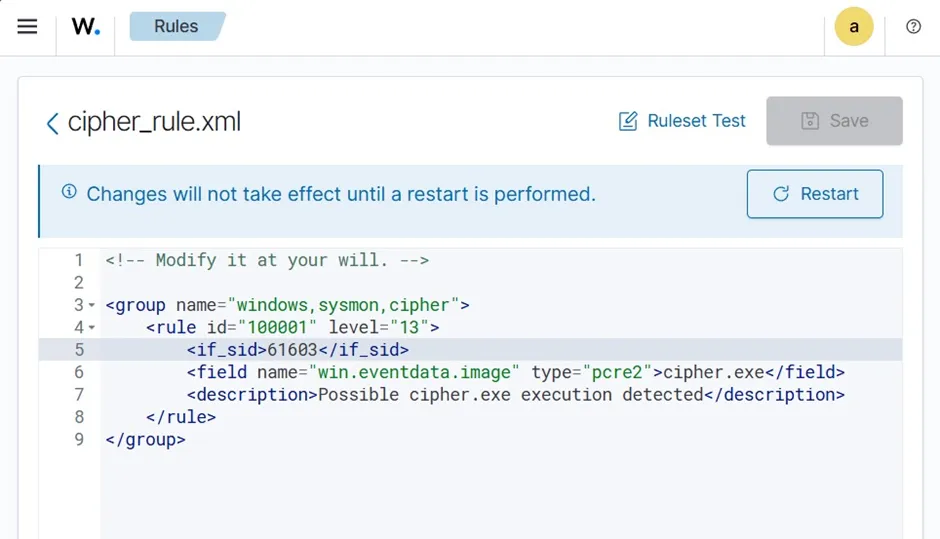
The if_sid matches the rule with another related rule ID. For this case, I am looking for a process creation. If I search for process creation rule from my wazuh, I can see rule ID 61603 is for the Event 1: Process creation.
The Wazuh Manager service is restarted to make the updated rule take effect. To restart from the server itself: sudo systemctl restart wazuh-manager
To test the rule, I go back to my Windows machine and run the command cipher. I get a hit on the rule triggered with one event showing the message “Possible cipher.exe execution detected”.