

Notes
I have not made extensive documentation on this. Here are my notes on the responsive action types and some sample workflows I had set up. There are a lot of troubleshooting and different configuration required for each.
Achieve responsive action
local means that the script will be running on the host that generated the alert
<active-response> <command>firewall-drop</command> <location>local</location> <level>5</level> <timeout>no</timeout></active-response>restart wazuh manager
Active response specially while using APIs, the command name appends the timeout to the name.
The command for dropping an IP: firewall-drop
But if we want to use this with the API, we must append the timeout at the end: firewall-drop0
One way to see the name and test to see if the script is active, we can check the agent control binary. Which is located under /var/ossec/bin/. By running the binary ./agent_control -L we can see the Response name. We’ll want to use the Response name to use it with the API.
To run the command
./agent_control -b 8.8.8.8 -f firewall-drop0 -u 002On the endpoint, check the active-responses.log file to check for triggered active responses. The json format can also be observed from there.
configure shuffle wazuh app to send the request to block the IP.
Next step is to send an user input (shuffle app) to the analyst via email.
If the analyst wants to block the IP, responsive wazuh should kick in.
iptables --listExample usecases
automatically disable user from active directory if the user entered their credentials onto a phishing page. Or maybe contain a host if there is suspicious activity (like mimikatz example)
Steps for SSH brute force automatic response
- Create ubuntu machine on the cloud with minimum specs. should have a difficult password set so that it is not easy to guess. autogenerate pass. Allow all inbound traffic
- Install Wazuh agent on the ubuntu machine. should see SSH brute force activity
- Push all level 5 alerts to shuffle
- Perform IP enrichment using VirusTotal
- Send details via email to the user. ask to block source IP
- Create an alert in TheHive
- If user selects yes to block, the IP should automatically be placed for DROP in iptables
Command to see if components are running:
ps -eo "pid user args" | grep java | grep -v grep | cut -c1-120Example configuration for Mimikatz responsive action
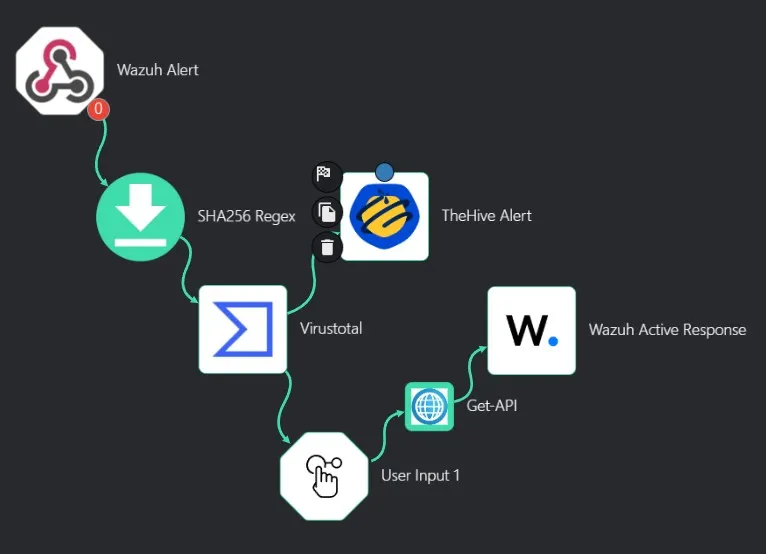
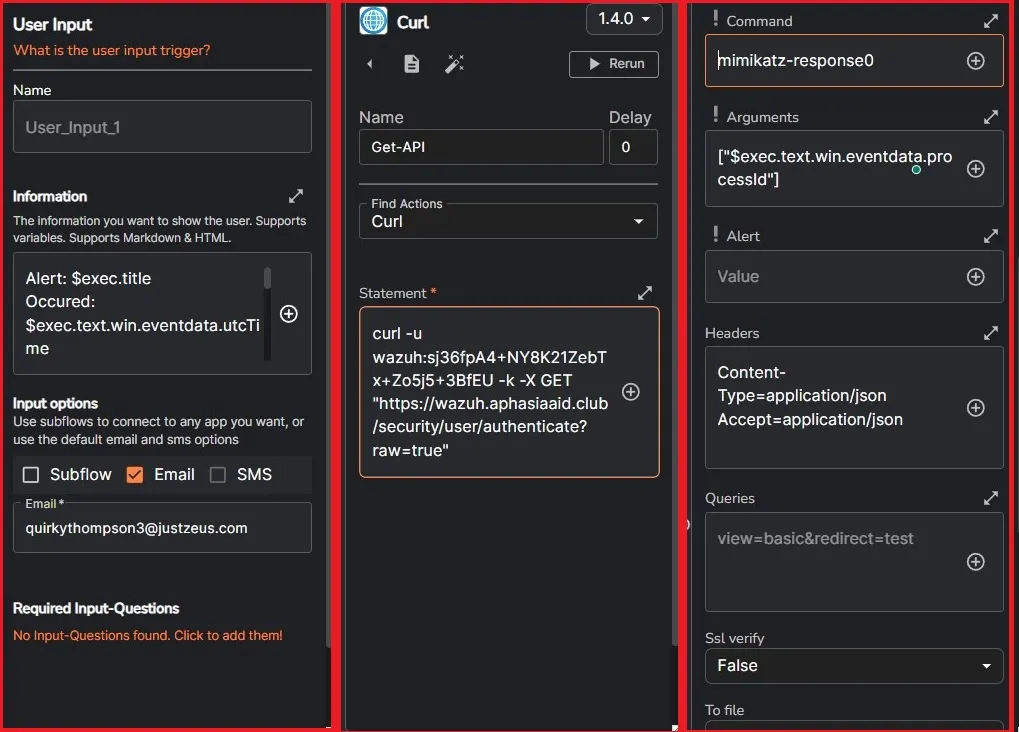
also need to configure the active response commands and tags in the configuration file in the wazuh server.
This setup allows me to contain the Windows client (with wazuh agent) to perform active response using a custom script.
The wazuh custom script documentation
Wazuh may not work easily with Windows clients. Which has happened in my case.
Ubuntu agent with SSH exposed was configured with the firewall-drop active response action and it performed as expected by blocking the srcip.
I will organize and properly structure this guide as and when possible in future. For now I am ending the project here.