

RFID based Identity Management System - IoT implementation
This is a project done as part of a course titled IoT & Cyber Physical Systems, Department of ECE, NIT Warangal
Project Outline
| Hardware components used | Software components used |
|---|---|
| ESP32 development board | Arduino IDE |
| RFID RC522 reader module | XAMPP server |
| SSD1306 OLED 128X64 display module | PHP source code |
| Male-to-male jumper wire X 11 | RFID RC522 library |
| Solderless breadboard mini X 2 | ESP32 library and board manager |
| Adafruit SSD1306 library |
Technologies Used
- Embedded C
- PHP
- MySQL
- Apache 2 server (XAMPP)
- Javascript
- CSS
Network Topology
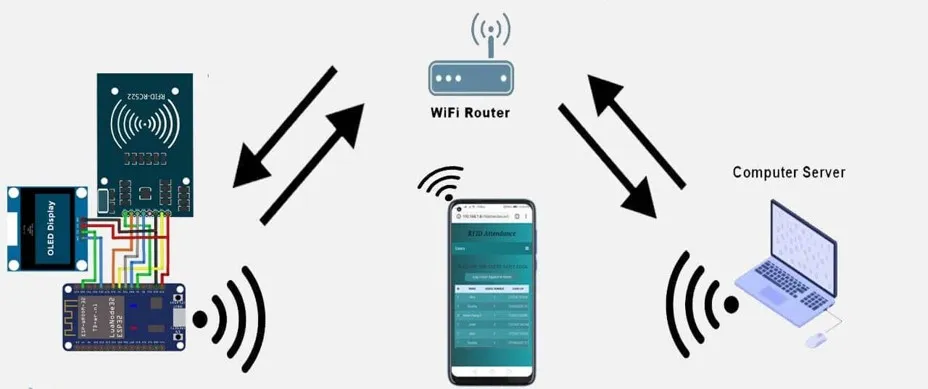
Interfacing of the components
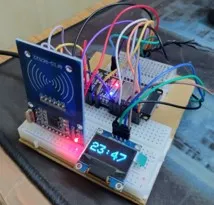
| ESP32 to RC522 PIN layout | ESP32 to SSD1306 Display PIN layout |
|---|---|
| D2 -> SDA | GND -> GND |
| D18 -> SCK | VIN -> VCC |
| D23 -> MOSI | D22 -> SCL |
| D19 -> MISO | D21 -> SDA |
| GND -> GND | |
| D5 -> RST | |
| 3V3 -> 3.3V |
Steps to implement
-
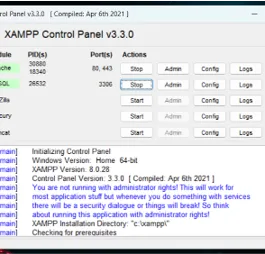
Deploy MySQL and Apache server from the XAMPP control panel
-
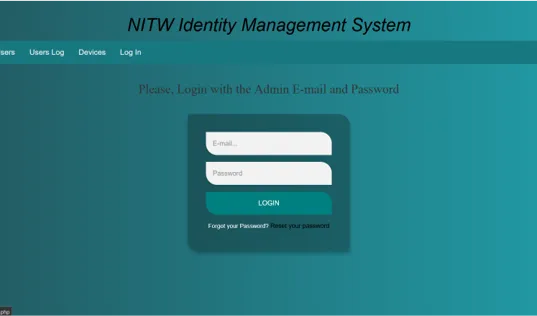
Configure localhost of the server with the MySQL database. After creating the database, go to
http://localhost/nitw-ims/ -
Set up ArduinoIDE for the ESP32 development board
-
Connect the ESP32 board via USB and upload the source code sketch source/source.ino
-
Admin account and user accounts are to be updated on the database hosted on the local server. Default credentials: email:
admin@gmail.com, password:123 -
Do test runs with different RFID cards/tags
/* RFID based Automated identity management system - IoT project sketch  Using ESP32 development board, MFRC522 reader module  and SSD1306 128X64 0.96 inch OLED display
  Ucchas Muhury  B.Tech Mechanical Engineering  Roll no. 203170*/
//ESP32 onboard libraries#include <WiFi.h>#include <HTTPClient.h>#include <time.h>//RFID libraries#include <SPI.h>#include <MFRC522.h>               //https://github.com/miguelbalboa/rfid//OLED libraries#include <Wire.h>#include <Adafruit_GFX.h>          //https://github.com/adafruit/Adafruit-GFX-Library#include <Adafruit_SSD1306.h>      //https://github.com/adafruit/Adafruit_SSD1306
// ESP32 to RC522 PIN layout:   |     ESP32 to SSD1306 Display PIN layout://     D2 -> SDA                |       GND -> GND//     D18 -> SCK               |       VIN -> VCC//     D23 -> MOSI              |       D22 -> SCL//     D19 -> MISO              |       D21 -> SDA//     GND -> GND               |//     D5 -> RST                |//     3V3 -> 3.3V              |
#define SS_PIN  2#define RST_PIN 5
// Declaration for SSD1306 display connected using software I2C pins are(22 SCL, 21 SDA)#define SCREEN_WIDTH 128 // OLED display width in pixels#define SCREEN_HEIGHT 64 // OLED display height in pixels#define OLED_RESET     0 // Reset pin # (or -1 if sharing Arduino reset pin)Adafruit_SSD1306 display(SCREEN_WIDTH, SCREEN_HEIGHT, &Wire, OLED_RESET);
// Defined pins to module RC522MFRC522 mfrc522(SS_PIN, RST_PIN); // MFRC522 instance
/* Set credentials. */const char *ssid = "UcchasPC";const char *password = "pakhirbasha";const char* device_token  = "e836658407de2895";//************************************************************************
int timezone = 5.5 * 3600;   // 5.5 hrs for IST, timezone in secondsint time_dst = 0;String getData, Link;String OldCardID = "";unsigned long previousMillis1 = 0;unsigned long previousMillis2 = 0;String URL = "http://192.168.137.1/nitw-ims/getdata.php"; // Set computer IP or the server domain
//*************************Biometric Icons*********************************#define Wifi_start_width 54#define Wifi_start_height 49const uint8_t PROGMEM Wifi_start_bits[] = {  0x00,0x00,0x00,0x00,0x00,0x00,0x00,0x00,0x00,0x00,0x00,0x00,0x00,0x00,0x00,0x00,0x00,0x00,0x00,0x00,0x00,0x00,0x00,0x00,0x00,0x00,0x00,0x00,0x00,0x00,0x00,0x00,0x00,0x00,0x00,0x00,0x00,0x1f,0xf0,0x00,0x00,0x00,0x00,0x03,0xff,0xff,0x80,0x00,0x00,0x00,0x1f,0xf0,0x1f,0xf0,0x00,0x00,0x00,0x7e,0x00,0x00,0xfc,0x00,0x00,0x01,0xf0,0x00,0x00,0x1f,0x00,0x00,0x03,0xc0,0x00,0x00,0x07,0xc0,0x00,0x0f,0x00,0x00,0x00,0x01,0xe0,0x00,0x1c,0x00,0x00,0x00,0x00,0x70,0x00,0x38,0x00,0x07,0xc0,0x00,0x38,0x00,0x70,0x00,0xff,0xfe,0x00,0x1e,0x00,0xe0,0x03,0xfc,0x7f,0xc0,0x0e,0x00,0x00,0x1f,0x80,0x03,0xf0,0x00,0x00,0x00,0x3c,0x00,0x00,0x78,0x00,0x00,0x00,0xf0,0x00,0x00,0x1c,0x00,0x00,0x01,0xe0,0x00,0x00,0x0c,0x00,0x00,0x03,0x80,0x00,0x00,0x00,0x00,0x00,0x03,0x00,0x00,0x00,0x00,0x00,0x00,0x00,0x00,0x3f,0xf8,0x07,0x1e,0x00,0x00,0x00,0xff,0xfe,0x1f,0xbf,0x80,0x00,0x03,0xe0,0x04,0x7f,0xff,0xc0,0x00,0x07,0x80,0x00,0xff,0xff,0xe0,0x00,0x0e,0x00,0x00,0xff,0xff,0xe0,0x00,0x0c,0x00,0x00,0x7f,0xff,0xc0,0x00,0x00,0x00,0x00,0xfe,0x07,0xe0,0x00,0x00,0x00,0x03,0xf8,0x03,0xf8,0x00,0x00,0x07,0xe7,0xf9,0xf1,0xfc,0x00,0x00,0x1f,0xe7,0xf1,0xf9,0xfc,0x00,0x00,0x1f,0xe7,0xf3,0xf9,0xfc,0x00,0x00,0x3f,0xe7,0xf3,0xf9,0xfc,0x00,0x00,0x3f,0xe7,0xf1,0xf1,0xfc,0x00,0x00,0x3f,0xe3,0xf8,0xe3,0xfc,0x00,0x00,0x3f,0xf3,0xfc,0x07,0xf8,0x00,0x00,0x1f,0xf0,0x7f,0x0f,0xc0,0x00,0x00,0x0f,0xe0,0x7f,0xff,0xe0,0x00,0x00,0x07,0xc0,0xff,0xff,0xe0,0x00,0x00,0x00,0x00,0x7f,0xff,0xe0,0x00,0x00,0x00,0x00,0x3f,0xff,0x80,0x00,0x00,0x00,0x00,0x1f,0xbf,0x00,0x00,0x00,0x00,0x00,0x03,0x18,0x00,0x00,0x00,0x00,0x00,0x00,0x00,0x00,0x00,0x00,0x00,0x00,0x00,0x00,0x00,0x00,0x00,0x00,0x00,0x00,0x00,0x00,0x00,0x00,0x00,0x00,0x00,0x00,0x00,0x00,0x00,0x00,0x00,0x00,0x00,0x00};
#define Wifi_connected_width 63#define Wifi_connected_height 49const uint8_t PROGMEM Wifi_connected_bits[] = {  0x00,0x00,0x00,0x00,0x00,0x00,0x00,0x00,0x00,0x00,0x00,0x00,0x00,0x00,0x00,0x00,0x00,0x00,0x00,0x00,0x00,0x00,0x00,0x00,0x00,0x00,0x00,0x00,0x00,0x00,0x00,0x00,0x00,0x00,0x00,0x00,0x00,0x00,0x00,0x00,0x00,0x00,0x00,0x00,0x00,0x00,0x00,0x00,0x00,0x00,0x00,0x00,0x00,0x00,0x00,0x00,0x00,0x00,0x03,0xff,0xff,0x80,0x00,0x00,0x00,0x00,0x3f,0xff,0xff,0xf8,0x00,0x00,0x00,0x01,0xff,0xff,0xff,0xff,0x00,0x00,0x00,0x0f,0xff,0xff,0xff,0xff,0xe0,0x00,0x00,0x3f,0xff,0xc0,0x07,0xff,0xf8,0x00,0x00,0xff,0xf8,0x00,0x00,0x3f,0xfe,0x00,0x03,0xff,0x80,0x00,0x00,0x03,0xff,0x80,0x07,0xfe,0x00,0x00,0x00,0x00,0xff,0xc0,0x1f,0xf8,0x00,0x00,0x00,0x00,0x3f,0xf0,0x3f,0xe0,0x01,0xff,0xff,0x00,0x0f,0xf8,0x7f,0x80,0x0f,0xff,0xff,0xe0,0x03,0xfc,0xff,0x00,0x7f,0xff,0xff,0xfc,0x01,0xfe,0xfc,0x01,0xff,0xff,0xff,0xff,0x00,0x7e,0x78,0x07,0xff,0xc0,0x07,0xff,0xc0,0x3c,0x00,0x0f,0xfc,0x00,0x00,0x7f,0xe0,0x00,0x00,0x1f,0xf0,0x00,0x00,0x1f,0xf0,0x00,0x00,0x3f,0xc0,0x00,0x00,0x07,0xf8,0x00,0x00,0x7f,0x00,0x01,0x00,0x01,0xfc,0x00,0x00,0x7e,0x00,0x7f,0xfc,0x00,0xfc,0x00,0x00,0x3c,0x03,0xff,0xff,0x80,0x78,0x00,0x00,0x00,0x07,0xff,0xff,0xc0,0x00,0x00,0x00,0x00,0x1f,0xff,0xff,0xf0,0x00,0x00,0x00,0x00,0x3f,0xf0,0x1f,0xf8,0x00,0x00,0x00,0x00,0x3f,0x80,0x03,0xf8,0x00,0x00,0x00,0x00,0x3f,0x00,0x01,0xf8,0x00,0x00,0x00,0x00,0x1c,0x00,0x00,0x70,0x00,0x00,0x00,0x00,0x00,0x01,0x00,0x00,0x00,0x00,0x00,0x00,0x00,0x0f,0xe0,0x00,0x00,0x00,0x00,0x00,0x00,0x1f,0xf0,0x00,0x00,0x00,0x00,0x00,0x00,0x3f,0xf8,0x00,0x00,0x00,0x00,0x00,0x00,0x3f,0xf8,0x00,0x00,0x00,0x00,0x00,0x00,0x3f,0xf8,0x00,0x00,0x00,0x00,0x00,0x00,0x3f,0xf8,0x00,0x00,0x00,0x00,0x00,0x00,0x1f,0xf0,0x00,0x00,0x00,0x00,0x00,0x00,0x0f,0xe0,0x00,0x00,0x00,0x00,0x00,0x00,0x00,0x00,0x00,0x00,0x00,0x00,0x00,0x00,0x00,0x00,0x00,0x00,0x00,0x00,0x00,0x00,0x00,0x00,0x00,0x00,0x00,0x00,0x00,0x00,0x00,0x00,0x00,0x00,0x00,0x00,0x00,0x00,0x00,0x00,0x00,0x00,0x00,0x00,0x00,0x00,0x00,0x00,0x00,0x00,0x00,0x00,0x00,0x00,0x00,0x00,0x00,0x00,0x00};
//************************************************************************void setup() {  delay(1000);  Serial.begin(115200);  SPI.begin();  // Init SPI bus  mfrc522.PCD_Init(); // Init MFRC522 card  Serial.println("reader card initiated...");  Serial.println();
  //-----------initiate OLED display-------------  if(!display.begin(SSD1306_SWITCHCAPVCC, 0x3C)) { // Address 0x3D for 128x64    Serial.println(F("SSD1306 allocation failed"));    for(;;); // Don't proceed, loop forever  }  // you can delet these three lines if you don't want to get the Adfruit logo appear  // display.display();  // delay(2000); // Pause for 2 seconds  // display.clearDisplay();  //---------------------------------------------  connectToWiFi();  //---------------------------------------------  configTime(timezone, time_dst, "pool.ntp.org","time.nist.gov");}

//************************************************************************void loop() {  // check if there's a connection to Wi-Fi or not  if(!WiFi.isConnected()){    connectToWiFi();    // Retry to connect to Wi-Fi  }  //---------------------------------------------  if (millis() - previousMillis1 >= 1000) {    previousMillis1 = millis();    display.clearDisplay();
    time_t now = time(nullptr);    struct tm* p_tm = localtime(&now);    display.setTextSize(1);             // Normal 2:2 pixel scale    display.setTextColor(WHITE);        // Draw white text    display.setCursor(10,0);    Serial.println(p_tm);    display.setTextSize(4);             // Normal 2:2 pixel scale    display.setTextColor(WHITE);        // Draw white text    display.setCursor(0,21);    if ((p_tm->tm_hour)<10) {display.print("0");display.print(p_tm->tm_hour);}    else display.print(p_tm->tm_hour);    display.print(":");    if ((p_tm->tm_min)<10) {display.print("0");display.println(p_tm->tm_min);}    else display.println(p_tm->tm_min);    display.display();  }
  //---------------------------------------------  if (millis() - previousMillis2 >= 15000) {    previousMillis2 = millis();    OldCardID="";  }  delay(50);  //---------------------------------------------  //look for new card  if ( ! mfrc522.PICC_IsNewCardPresent()) {    return; // got to start of loop if there is no card present  }  // Select one of the cards  if ( ! mfrc522.PICC_ReadCardSerial()) {    return; //if read card serial(0) returns 1, the uid struct contians the ID of the read card.  }  String CardID ="";  for (byte i = 0; i < mfrc522.uid.size; i++) {    CardID += mfrc522.uid.uidByte[i];  }  //---------------------------------------------  if( CardID == OldCardID ){    return;  }  else{    OldCardID = CardID;  }  //---------------------------------------------
  // Serial.println(CardID);  SendCardID(CardID);  delay(1000);  display.clearDisplay();}
//************send the Card UID to the website*************void SendCardID( String Card_uid ){  Serial.println("Sending the Card ID");  if(WiFi.isConnected()){    HTTPClient http;    //Declare object of class HTTPClient    //GET Data    getData = "?card_uid=" + String(Card_uid) + "&device_token=" + String(device_token); // Add the Card ID to the GET array in order to send it    //GET method    Link = URL + getData;    http.begin(Link); //initiate HTTP request   //Specify content-type header
    int httpCode = http.GET();   //Send the request    String payload = http.getString();    //Get the response payload
//    Serial.println(Link);   //Print HTTP return code    Serial.println(httpCode);   //Print HTTP return code    Serial.println(Card_uid);     //Print Card ID    Serial.println(payload);    //Print request response payload
    if (httpCode == 200) {      if (payload.substring(0, 5) == "login") {        String user_name = payload.substring(5);    //  Serial.println(user_name);
        display.clearDisplay();        display.setTextSize(2);             // Normal 2:2 pixel scale        display.setTextColor(WHITE);        // Draw white text        display.setCursor(15,0);             // Start at top-left corner        display.print(F("Welcome"));        display.setCursor(0,20);        display.print(user_name);        display.display();      }      else if (payload.substring(0, 6) == "logout") {        String user_name = payload.substring(6);    //  Serial.println(user_name);
        display.clearDisplay();        display.setTextSize(2);             // Normal 2:2 pixel scale        display.setTextColor(WHITE);        // Draw white text        display.setCursor(10,0);             // Start at top-left corner        display.print(F("Good Bye"));        display.setCursor(0,20);        display.print(user_name);        display.display();      }      else if (payload == "succesful") {        display.clearDisplay();        display.setTextSize(2);             // Normal 2:2 pixel scale        display.setTextColor(WHITE);        // Draw white text        display.setCursor(5,0);             // Start at top-left corner        display.print(F("New Card"));        display.display();      }      else if (payload == "available") {        display.clearDisplay();        display.setTextSize(2);             // Normal 2:2 pixel scale        display.setTextColor(WHITE);        // Draw white text        display.setCursor(5,0);             // Start at top-left corner        display.print(F("Free Card"));        display.display();      }      delay(100);      http.end();  //Close connection    }  }}
//********************connect to the WiFi******************void connectToWiFi(){    WiFi.mode(WIFI_OFF);        //Prevents reconnection issue (taking too long to connect)    delay(1000);    WiFi.mode(WIFI_STA);    Serial.print("Connecting to ");    Serial.println(ssid);    WiFi.begin(ssid, password);
    display.clearDisplay();    display.setTextSize(1);             // Normal 1:1 pixel scale    display.setTextColor(WHITE);        // Draw white text    display.setCursor(0, 0);             // Start at top-left corner    display.print(F("Connecting to \n"));    display.setCursor(0, 50);    display.setTextSize(2);    display.print(ssid);    display.drawBitmap( 73, 10, Wifi_start_bits, Wifi_start_width, Wifi_start_height, WHITE);    display.display();
    while (WiFi.status() != WL_CONNECTED) {      delay(500);      Serial.print(".");    }    Serial.println("");    Serial.println("Connected");
    display.clearDisplay();    display.setTextSize(2);             // Normal 1:1 pixel scale    display.setTextColor(WHITE);        // Draw white text    display.setCursor(8, 0);             // Start at top-left corner    display.print(F("Connected \n"));    display.drawBitmap( 33, 15, Wifi_connected_bits, Wifi_connected_width, Wifi_connected_height, WHITE);    display.display();
    Serial.print("IP address: ");    Serial.println(WiFi.localIP());  //IP address assigned to your ESP
    delay(1000);}//=======================================================================