

INetSim
INetSim comes pre-installed on the REMnux machine. This tool allows us to configure and simulate standard internet services like DNS, HTTP(S), SMTP, etc. The default configuration file is located at /etc/inetsim/inetsim.conf and the data directory containing various default files is located at /var/lib/inetsim.
Set new analysis directory
Each time I’ll have to do a new analysis, I’ll probably want a new INetSim configuration. For this purpose, I am creating a directory analysis to contain a sub-directory for each analysis I’ll perform.
remnux@remnux:~$ mkdir analysisFor testing out, I’m creating a sub-directory test-analysis and copying the default INetSim configuration file and the data directory in it.
remnux@remnux:~$ pwd/home/remnuxremnux@remnux:~$ mkdir analysisremnux@remnux:~$ lsanalysis Desktop Documents Downloads Music Pictures Public Templates Videosremnux@remnux:~$ mkdir analysis/test-analysisremnux@remnux:~$ cp /etc/inetsim/inetsim.conf analysis/test-analysisremnux@remnux:~$ sudo cp -r /var/lib/inetsim/ analysis/test-analysis/dataremnux@remnux:~$ sudo chmod -R 777 analysis/test-analysis/data/remnux@remnux:~$ cd analysis/test-analysis/remnux@remnux:~/analysis/test-analysis$ lsdata inetsim.confEdit configuration file
From the /analysis/test-analysis/ directory:
remnux@remnux:~/analysis/test-analysis$ sudo nano inetsim.confRemove # from start_service dns to enable a fake DNS service. Let’s also assign the 0.0.0.0 address to service_bind_address. This makes the services available to all the machines in our isolated virtual network. In the same way I will set dns_default_ip to the remnux machine IP address (10.0.0.3 in this case). This will resolve any domain name to 10.0.0.3.
INetSim’s SSL support is not optimal. It only has a single certificate for a single hostname(inetsim.org). It also doesn’t allow to generate per-host certificates. This is a problem because most malwares nowadays encrypt their communications with SSL. For this reason, I’m going to run Burp later on port 443 as a transparent proxy in front of INetSim.
INetSim’s HTTPS server is bound to port 443 by default. I am changing the https_bind_port to an uncommon port 8443.
Let’s save the configuration file now.
Before running the INetSIm service, a conflict needs to be resolved first. There is a local DNS server systemd-resolved that is shipped by default with Ubuntu and this will conflict with my INetSim’s DNS server. To resolve this issue, I’m going to disable it.
remnux@remnux:~/analysis/test-analysis$ sudo systemctl disable systemd-resolved.serviceRemoved /etc/systemd/system/multi-user.target.wants/systemd-resolved.service.Removed /etc/systemd/system/dbus-org.freedesktop.resolve1.service.remnux@remnux:~/analysis/test-analysis$ sudo service systemd-resolved stopRun INetSim
remnux@remnux:~/analysis/test-analysis$ sudo inetsim --data data --conf inetsim.conf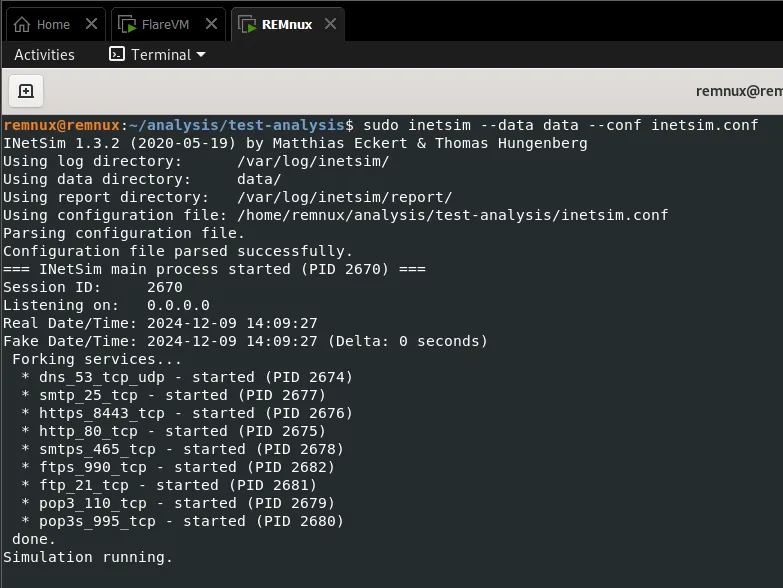
INetSim has now opened various services on their designated ports as configured.
Test the DNS service
Let’s make an HTTP request from our FlareVM machine to test out whether the fake DNS service is working or not.
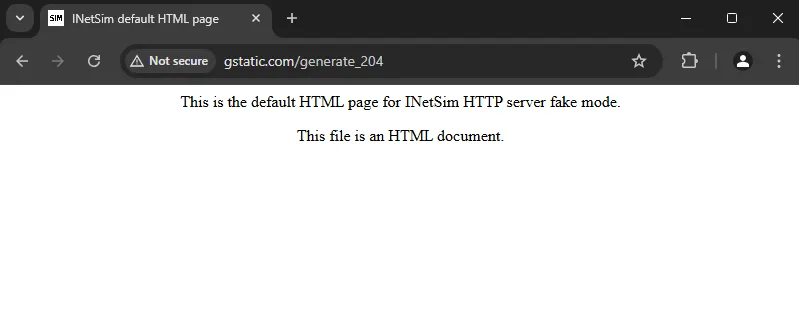
In response, I see the INetSim’s default HTML page located under analysis/test-analysis/data/http/fakefiles/sample.html. Even if we try to download a file by appending a name such as anything.exe, it will download the INetSim default binary file which is not harmful. This helps malware analysts uncover the malware behavior if it is downloading a malicious payload from a remote server.
Stop the simulation
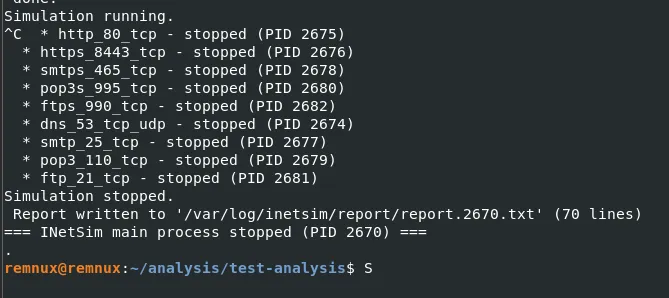
INetSim has created a summary report containing all the interactions the victim machine had with INetSim services.
remnux@remnux:~/analysis/test-analysis$ sudo cat /var/log/inetsim/report/report.2670.txt=== Report for session '2670' ===
Real start date            : 2024-12-09 14:09:27Simulated start date       : 2024-12-09 14:09:27Time difference on startup : none
2024-12-09 14:10:33  First simulated date in log file...2024-12-09 14:15:01  DNS connection, type: A, class: IN, requested name: gstatic.com2024-12-09 14:15:01  HTTP connection, method: GET, URL: http://gstatic.com/generate_204, file name: data/http/fakefiles/sample.html2024-12-09 14:15:01  HTTP connection, method: GET, URL: http://gstatic.com/favicon.ico, file name: data/http/fakefiles/favicon.ico...2024-12-09 14:16:48  DNS connection, type: A, class: IN, requested name: gstatic.com2024-12-09 14:16:50  HTTP connection, method: GET, URL: http://gstatic.com/generate_204/hello.exe, file name: data/http/fakefiles/sample_gui.exe...2024-12-09 14:24:11  Last simulated date in log file